From sign-up page. You enter your email and password, confirm the address from the message you receive, and the account is ready in a few minutes, no card.
Do I need to install anything?
No. Invoicy runs in the browser, on a computer or phone. You log in with your email and password and have your documents at hand.
Can I try Invoicy without giving up the program I use?
Yes. You open a free account and work in parallel, while you compare the documents, the price and how fast you issue an invoice.
How can I delete my account?
Write to us at [email protected] and we delete the account and its data.
Move your data from another program
How do I bring my old clients, products and invoices into Invoicy?
From Import page (opens after you log in). You choose the program you come from (Oblio, FGO, SmartBill or any Excel/CSV file), what you want to bring in (clients, products, suppliers or invoice history) and upload the file exported from there. You see what will be imported first, then confirm. Recommended order: clients, products, suppliers, then invoices.
How do I export my data from Oblio?
Clients, products and suppliers: in Oblio open Import / Export (link at the bottom of the page), go to the Oblio section, click Exportă Produse, Clienți sau Furnizori (Export Products, Clients or Suppliers), choose the type and click Export. You get one file per type (clients and suppliers come in the old .xls format, products in .xlsx; Invoicy reads both). Invoices: Rapoarte, Raport facturi (Reports, Invoice report), choose the period you want (the last 30 days by default, so for the whole history choose a longer period), then Exportă, Exportă Excel (Export, Export Excel). Upload the files to Invoicy without changing them.
How do I export my data from FGO?
In FGO you open, one after another, Facturi (Invoices), Clienți (Clients) and Produse, articole (Products, items) (the Vânzări, facturare menu (Sales, invoicing)). On each page you click the Export button at the top right and choose to export all records (for example “Exportă toate facturile” (Export all invoices)). You get one Excel file (.xlsx) for each. Upload them to Invoicy without changing them; if a column is not recognised, you choose it yourself in the checking step.
How do I export my data from SmartBill?
Clients and products: in SmartBill open Nomenclatoare, Clienți (Lists, Clients), then Nomenclatoare, Produse, and click Exportă (Export) at the top right. Invoices: Rapoarte, Facturi (Reports, Invoices), choose the period you want (the current month is shown by default, so for the whole history choose a longer period), click the arrow next to the download button at the top right and choose Exportă Excel (Export Excel). You get one .xls file for each. Upload them to Invoicy without changing them (SmartBill also asks you not to change the structure).
What happens if the import contains data that already exists?
Clients, products and invoices that already exist are skipped, so they do not appear twice. Historical invoices are kept only for the record: they are not sent to SPV again. Every import can be undone from History (Istoric), and the data it brought in disappears.
Plans, credits and payments
Who can use the free plan?
Anyone: sole proprietors, small companies or anyone who wants to try the app. The first year is free, with unlimited documents. After that the account stays free if you issue up to 3 documents per month.
How much do the plans cost?
Free costs 0 lei. Business costs 129 lei per year and Professional 199 lei per year, both with unlimited documents. Prices are in lei and paid once a year, not per invoice. Details on pricing page.
What happens after the first year?
If you issue up to 3 documents per month, the account stays free. If you need more, move to the Business plan. Documents created until then stay in your account.
How do I activate an annual plan?
From your account, under Credits and plan (Credite și plan), or through contact form. We send you the invoice, and after payment we activate the plan.
Subscription, Credits and plan (Abonament, Credite și plan): the plans and the active one.
Do I receive an invoice for the subscription?
Yes. For every annual plan we send you an invoice, with your company's details.
What are credits?
Credits pay for automatic document reading: a photo or a PDF turns into data, and you just check it and issue. A read costs 1 credit. Issuing documents does not use credits.
Your credit balance and plan, under Credits and plan (Credite și plan).
Do credits expire?
Credits bought in packs do not expire. Those included monthly in the Professional plan expire at the end of the month and are used first.
What does “Issued with Invoicy” at the end of the documents mean?
On the free plan, documents carry the line “Emis cu www.invoicy.ro” (Issued with www.invoicy.ro) at the end, which cannot be removed. On the Business and Professional plans you can hide it under Invoice template (Model factură).
Documents
Can I give special prices to some clients?
Yes, from Price lists (Liste de prețuri) (the Lists menu (Nomenclatoare), for users at Advanced level or higher). A list can have its own price for certain products and, in addition, a percentage discount on all the others. You put clients in the list (a client has at most one list), and on an invoice, proforma, delivery note, quote or order the product is filled in with the client's price, with a note showing which list it comes from. You can change the price line by line, and invoices already issued do not change. List prices are also used in bulk invoicing (when the file has no price) and in the API (a line with product_id or product_code and without unit_price).
Can I issue many invoices at once, from an Excel file?
Yes, from Bulk invoicing (Facturare în masă) (the Issuing documents menu (Emitere acte), for users at Advanced level or higher). You upload an Excel or CSV file where each row is an invoice line; rows with the same reference, or the same client, make up one invoice. You see in advance how many invoices will be created and their total, then you issue them: each gets its own number and e-Factura, like an invoice made by hand. The price can be missing from the file: it is then taken from your products and the client's price list. A run can have at most 500 invoices. Clients in Romania need a county (from the file, from the client record or from a default county you choose), because e-Factura requires it.
What types of documents can I issue?
Invoices, proformas, delivery notes, credit notes and receipts. Each type has its own series and numbering, and the PDF is generated right after saving.
The Issuing documents menu (Emitere Acte): invoice, credit note, proforma, delivery note and the recurring variants.
How do I choose the invoice template?
From Settings, under Invoice template (Setări, Model factură). You choose one of the 31 templates, then the colour, font, logo and signature.
Settings, Invoice template (Setări, Model factură): you choose the template and see the preview.
Can I edit an invoice that has already been issued?
As long as it has not been sent to SPV, you open it and edit it. After sending, you cancel it with a credit note and issue a correct one.
How do I copy or cancel an old invoice?
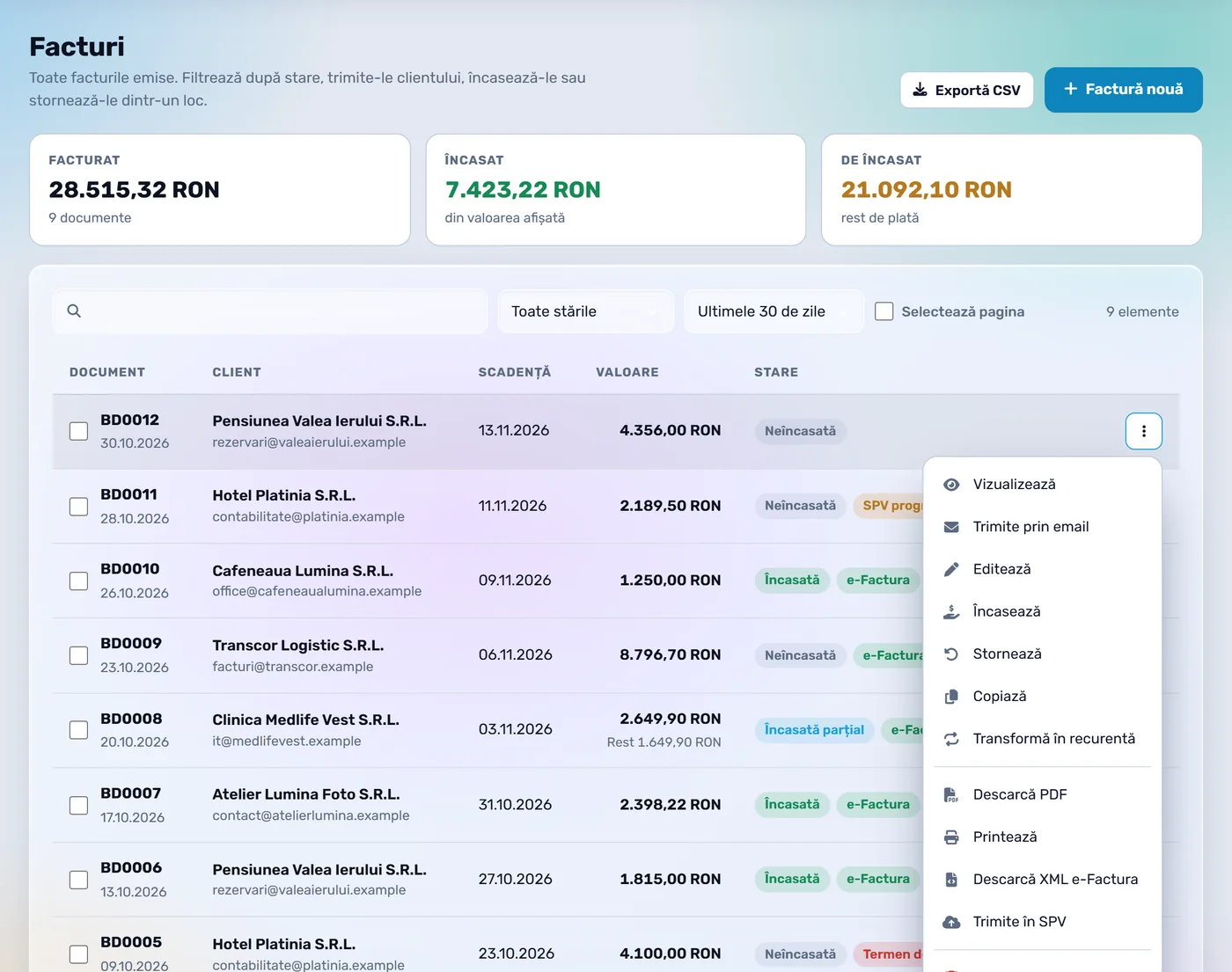
From the Invoice report (Raport facturi), in each row's menu: you copy the document, cancel it with a credit note, send it by email or download it. From a proforma you make an invoice with one click.
Invoice report (Raport facturi): the menu on each row.
Can I issue recurring invoices?
Yes, in the Business and Professional plans. You set the period, and the document is issued by itself and can go out automatically by email to the client.
Can I send the invoice to the client straight from the app?
Yes. The document goes out by email with the PDF attached. You can also set up automatic reminder messages for unpaid invoices.
Stock
Can I keep track of product stock in Invoicy?
Yes. For a product you tick “Track stock” (Ține stoc) (Lists, Products (Nomenclatoare, Produse)). Invoices reduce the quantity by themselves, and entries (NIR) increase it. You can have several warehouses, for example a warehouse and a store.
How do I put goods into stock?
With a goods receipt note (NIR): you choose the products, the quantity and the purchase price excluding VAT. For goods you already have, you make a NIR without a supplier, as opening stock.
Is stock reduced for proformas and delivery notes too?
Not for proformas: they do not change stock. A delivery note reduces stock from the moment of delivery, and if you then issue the invoice from the delivery note, only the difference is deducted, so you do not deduct twice. Credit notes bring the goods back.
What happens if I sell more than I have in stock?
The invoice can be issued anyway. Stock goes negative and is marked on the Stock page until the next entry. You also get a warning when you add the product to the invoice.
Can I count the goods in the warehouse?
Yes, under Stocktaking (Inventar). You write what you counted, and the app makes the adjustments for differences and remembers them.
Can I see how much I earn on each product?
Yes, under Profit per product (Profit pe produs): sales, cost of goods (average cost from entries) and profit, for the chosen period, with CSV export.
How is the cost of goods calculated: FIFO or average cost?
You choose, under Stock, Warehouses, Cost method (Stocuri, Gestiuni, Metoda de cost). Weighted average cost (default): at every entry, the product's cost is recalculated from the whole history. FIFO: goods sold are costed at the price of the oldest remaining entries. When you change the method, the cost of all past sales is recalculated, so profit per product changes for past periods too. You can switch back at any time.
How do I move goods between the warehouse and the store?
With a transfer between warehouses, under Stock, Transfers (Stocuri, Transferuri). The document is numbered, and the app does not let you move more than you have in the source warehouse.
How do I remove damaged goods or goods used internally from stock?
With a consumption note: you choose the reason and the products, and the goods leave stock at the average cost of that moment. If you delete it, the goods come back.
Can I do recipes and production?
Yes. A recipe has the finished product, the yield and the ingredients. On a production note, the ingredients leave stock and the finished product comes in at their cost. If an ingredient is missing, nothing happens and you get a message.
Does Invoicy replace the cash register?
No. Cash receipts in Invoicy are an internal record for counter sales and do not connect to a fiscal cash register.
Currency and VAT
Can I issue invoices in euro or other currencies?
Yes. You choose the currency when issuing, and the lei part is calculated automatically.
Which rate is used?
The BNR rate, updated every business day. For VAT expressed in lei, the rate of the business day before the invoice date is used.
Can I have different VAT rates on the same invoice?
Yes. Each line has its own rate, and totals per rate are calculated correctly.
e-Factura and SPV
Does Invoicy generate invoices in the e-Factura format?
Yes. For every invoice issued, an XML file in the CIUS-RO format required by ANAF is created. The generator is checked with ANAF's validation service.
How do I connect to SPV?
Once, from the app, with the company's digital certificate. The steps are in e-Factura page.
What do I need to connect?
The company's qualified digital certificate (USB token or cloud) and an SPV account registered with the CUI. If the token is with your accountant, they can do the setup.
Manually, with the “Send to SPV” (Trimite în SPV) button on the invoice, or automatically, a number of days after issuing. With automatic sending you have time to correct the invoice before it goes out.
The e-Factura page: manual or automatic, with the sending statuses.
How do I send several invoices to SPV at once?
From Send to SPV (Trimitere în SPV) (the Document reports menu (Rapoarte acte), Intermediate level or higher). You see the invoices that have not gone out yet, with the 5 business day deadline, choose the ones you want (or all) and schedule them now or in 24 hours. They go out in date order, at a pace ANAF accepts, and the blocked ones appear in separate tabs, with the reason and a retry button.
How do I see if the invoice was sent successfully?
In the Invoice report (Raport facturi), at the status of each invoice: yellow means ANAF is processing it, green that it was validated, red that there are errors. After processing, from “Vezi detalii” (See details) you download the SPV archive or see the errors.
Validated by ANAFSent, under reviewRejected by ANAF
What do I do if I made a mistake on an invoice sent to SPV?
You cancel it and issue a new one with the correct data. Both, the credit note and the correct invoice, are sent to SPV.
How do I send e-Factura for individuals?
You fill in the client's personal ID number (CNP) and the country Romania. You can hide it when sending, from Settings (Setări). If you do not have the CNP, leave the field empty and the system fills it with 13 zeros.
Settings, Preferences (Setări, Preferințe): Hide the CNP on documents.
Are invoices to clients outside Romania sent to SPV?
No. With automatic sending on, the system ignores them by itself. If you still want to send one, you use “Send to SPV” manually.
What errors can appear when sending?
Usually some client data is missing: CUI or CNP, country, city or address. For Bucharest, the city is written “Sector X” and the county “București”. Precision must be two decimals.
What are NC and CPV codes?
The NC code (Combined Nomenclature) has 8 digits and is used for the common customs tariff. The CPV code classifies public procurement and has at most 9 digits. Both are set for each product, under Lists (Nomenclatoare).
Yes, in the Professional plan: invoices received through SPV appear in a separate report.
Payments and reports
How do I record a payment?
From the invoice report or from the Payment page (Încasare). You can collect partially or fully, and the receipt is issued together with the payment.
New payment (Încasare nouă): you choose the client, tick the invoices and the amount.
What reports do I have?
Reports for invoices, proformas, delivery notes, credit notes and payments, plus the report of invoices in SPV. In each one you can filter by period and status.
Invoice report (Raport facturi), with totals and statuses.
Can I download several invoices at once?
Yes. In the Invoice report (Raport facturi) you tick the documents and download them in a ZIP archive with the PDFs.
You tick the invoices, then click Download PDFs.
Team and accountant
Can I give access to my accountant?
Yes, with the Professional plan. You create a separate user for your accountant, with their own password and the permissions you choose.
Settings, Account data (Setări, Date conturi): you add users with an access level.
How many users can I have?
The free and Business plans have one user. The Professional plan allows additional users, with different roles.
I am an accountant and work with several clients. Do you have an offer?